Instagram Login Problem Fix Guide
Instagram has become one of the world’s most used social media platforms for communication, business promotion, content creation, and entertainment. However, millions of users face Instagram login problems daily, ranging from password errors to suspicious login attempts, app crashes, and account verification issues. These problems can prevent users from accessing important messages, business accounts, and personal content.
This complete Instagram login problem fix guide explains the most common login issues, why they happen, and the best solutions to recover your account safely and quickly. Whether you use Android, iPhone, or desktop, these troubleshooting methods can help restore access to your Instagram account effectively.
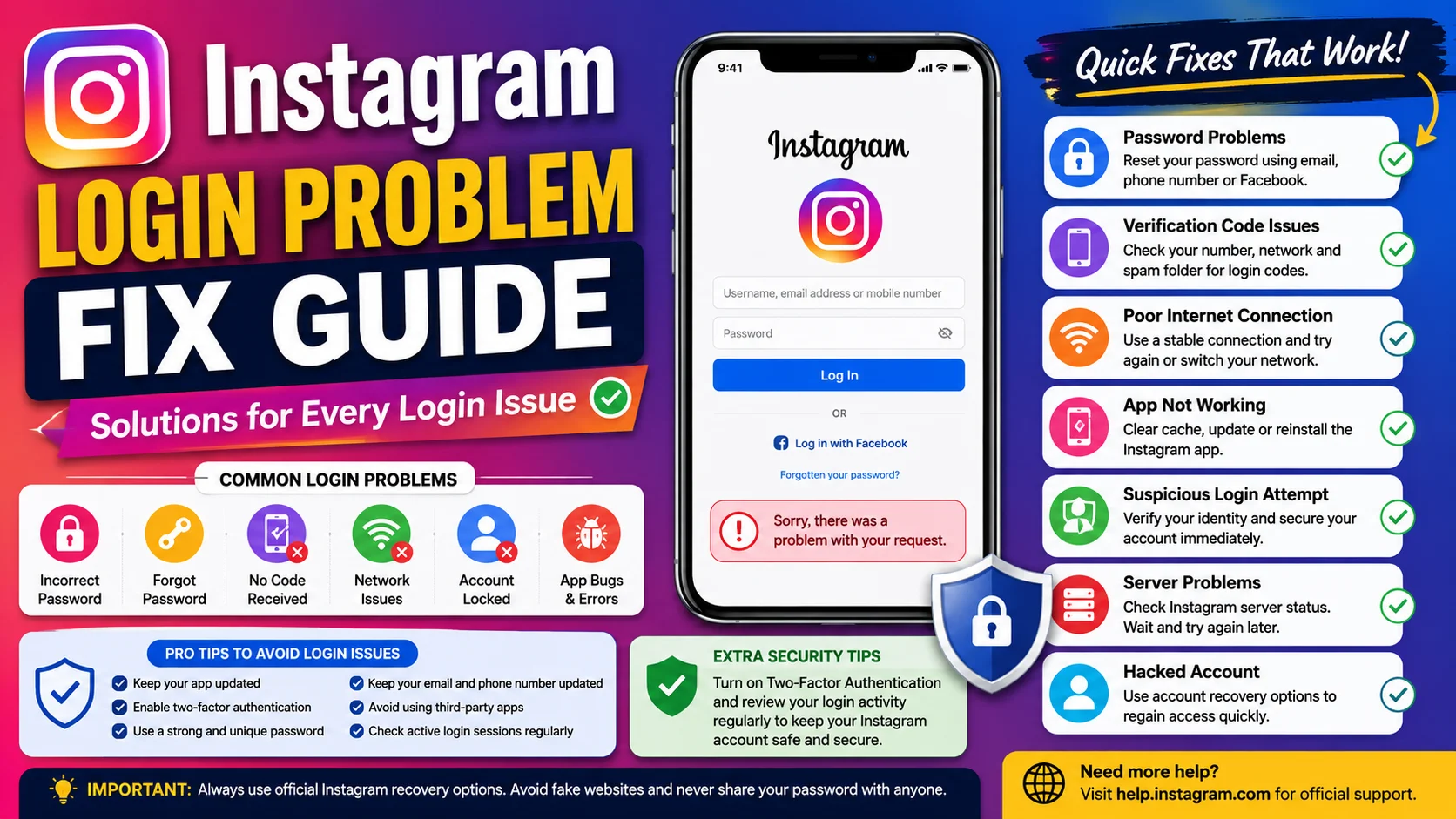
Why Instagram Login Problems Happen
Instagram login issues can happen due to several technical and security-related reasons. Sometimes the problem is connected to Instagram’s servers, while in other cases it may involve incorrect passwords, outdated apps, internet problems, or suspicious account activity. Users often panic when they suddenly cannot access their accounts, especially creators and businesses relying on Instagram daily.
Some common causes include:
-
Incorrect username or password
-
Weak internet connection
-
Instagram server downtime
-
Hacked or compromised account
-
App cache corruption
-
Outdated Instagram app version
-
Login attempts from multiple devices
-
Two-factor authentication issues
-
Temporary account lock or restriction
Understanding the real reason behind the problem helps users apply the correct solution faster instead of trying random fixes repeatedly.
Incorrect Password or Username Issues
One of the most common Instagram login problems occurs when users enter the wrong password or username. Many people accidentally use old passwords, incorrect email addresses, or outdated phone numbers connected to their accounts. In some cases, keyboard auto-fill features may also enter incorrect credentials automatically.
If you forgot your password, use Instagram’s “Forgot Password” option to reset access securely. Instagram usually sends a recovery link through:
-
Registered email address
-
Connected mobile number
-
Linked Facebook account
Example Scenario
Suppose a user changed their password two weeks ago but continues entering the old password unknowingly. Instagram may temporarily block login attempts after multiple failures for security protection. Resetting the password immediately resolves the issue in most cases.
To avoid future password problems:
-
Use a password manager
-
Create strong but memorable passwords
-
Update recovery email and phone details regularly
-
Avoid sharing passwords with others
Instagram App Not Opening Properly
Sometimes Instagram login problems are caused by app-related issues rather than account credentials. Users may notice the app crashing instantly, freezing on the loading screen, or showing a blank display during login attempts.
This problem usually happens because of:
-
Corrupted app cache
-
Outdated application version
-
Device software conflicts
-
Low storage space
-
Background app errors
Clearing the Instagram cache often fixes temporary glitches quickly.
Steps to Clear Instagram Cache on Android
-
Open Device Settings
-
Go to Apps
-
Select Instagram
-
Tap Storage
-
Choose Clear Cache
For iPhone users, reinstalling the app usually removes corrupted temporary files automatically.
Keeping the Instagram app updated ensures compatibility with the latest security patches and performance improvements released by Instagram regularly.
Instagram Server Down Problems
Sometimes the issue is not from your device or account at all. Instagram servers occasionally experience outages or technical maintenance periods that prevent users from logging in successfully. During server downtime, users may see messages like:
-
“Couldn’t refresh feed”
-
“Login failed”
-
“Something went wrong”
-
“Please try again later”
When Instagram servers are down globally, millions of users may experience login issues simultaneously.
Server Issue Impact Example
| Problem Type | User Experience |
|---|---|
| Global Server Outage | Login unavailable worldwide |
| Partial Server Failure | Stories or messages not loading |
| Security Maintenance | Temporary login restrictions |
| Regional Technical Issue | Login issues in specific countries |
Users should check trusted outage monitoring websites or social media discussions before assuming their account is permanently blocked.
Hacked Instagram Account Recovery
Hacked Instagram accounts are becoming increasingly common worldwide. Cybercriminals often target accounts with large followings, business pages, or weak passwords. If hackers change your password, email, or phone number, you may lose account access completely.
Signs your Instagram account may be hacked include:
-
Unknown login activity
-
Changed email address
-
Unauthorized posts or messages
-
Password suddenly not working
-
Suspicious followers or activity
Instagram provides an official recovery process where users can verify identity using selfies, recovery emails, or linked device information.
To improve account security after recovery:
-
Enable two-factor authentication
-
Remove suspicious third-party apps
-
Change passwords immediately
-
Review active login sessions regularly
Strong account protection significantly reduces future hacking risks.
Two-Factor Authentication Login Problems
Two-factor authentication improves account security but sometimes creates login complications. Users may fail to receive verification codes because of SIM card issues, network problems, or lost devices.
If verification codes are not arriving:
-
Wait several minutes before retrying
-
Ensure correct phone number is connected
-
Check spam or blocked SMS settings
-
Use backup recovery codes if available
-
Try logging in from a trusted device
Many users lose access simply because they forget to save their backup authentication codes. Keeping these codes stored securely can prevent major recovery issues later.
Instagram Suspicious Login Attempt Error
Instagram frequently blocks unusual login activity to protect accounts from unauthorized access. This usually happens when users:
-
Login from a new location
-
Use VPN services
-
Switch devices repeatedly
-
Attempt multiple failed logins
-
Use automation tools
When Instagram detects suspicious activity, it may request identity verification before allowing account access again.
Example of Suspicious Login Protection
If a user normally logs in from India but suddenly attempts access from another country within minutes, Instagram’s security system may temporarily lock the account until identity confirmation is completed.
To avoid triggering suspicious login errors:
-
Avoid frequent device switching
-
Disable risky automation apps
-
Use trusted internet connections
-
Maintain updated recovery information
Security systems are designed to protect accounts, even though they can sometimes feel inconvenient to legitimate users.
Poor Internet Connection and Network Errors
Weak internet connectivity is another major cause of Instagram login failures. Instagram requires stable internet access for authentication, security checks, and data synchronization. Public Wi-Fi networks, unstable mobile data, or DNS issues can interrupt the login process unexpectedly.
Common network-related symptoms include:
-
Endless loading screen
-
Login timeout errors
-
“No internet connection” messages
-
Delayed verification codes
Users should try:
-
Restarting Wi-Fi router
-
Switching between mobile data and Wi-Fi
-
Enabling airplane mode briefly
-
Restarting the device
-
Using another internet network
Stable internet access often resolves login issues immediately without requiring account changes.
Instagram Account Temporarily Locked
Instagram may temporarily lock accounts that violate platform guidelines or display spam-like behavior. Users who aggressively follow/unfollow accounts, post repetitive comments, or use third-party automation software are more likely to face temporary restrictions.
Account lock duration depends on the severity of suspicious activity. Some restrictions last a few hours, while others continue for several days.
Activities That Can Trigger Temporary Locks
| Risky Activity | Possible Result |
|---|---|
| Mass following users | Temporary restriction |
| Repeated spam comments | Login challenge |
| Automation tool usage | Security verification |
| Fake engagement services | Account limitation |
Avoiding aggressive growth tactics helps maintain stable account access and long-term account safety.
How to Fix Instagram Login Problems Quickly
Most Instagram login issues can be solved using basic troubleshooting methods if users stay calm and follow the correct process systematically.
Recommended Instagram Login Fix Checklist
-
Reset forgotten passwords safely
-
Update Instagram to the latest version
-
Clear app cache regularly
-
Check internet connection stability
-
Verify Instagram server status
-
Disable VPN temporarily
-
Reinstall the Instagram app
-
Enable two-factor authentication
-
Remove suspicious third-party apps
-
Use official Instagram recovery options only
Users should avoid unofficial recovery websites or fake support pages because scammers often target locked-out Instagram users.
Best Long-Tail Keywords for Instagram Login Problems
Using SEO-focused keywords improves search engine visibility and helps users discover relevant troubleshooting content faster.
Important long-tail keywords include:
-
instagram login problem fix guide
-
how to fix instagram login error
-
instagram account not logging in
-
instagram password reset not working
-
fix instagram suspicious login attempt
-
instagram app login issue solution
-
hacked instagram account recovery guide
-
instagram verification code not received
-
how to recover locked instagram account
-
instagram login problem on android and iphone
These keywords align closely with real search behavior and improve content ranking opportunities globally.
Final Thoughts
Instagram login problems can happen for many reasons, including incorrect passwords, app glitches, server outages, security restrictions, hacking attempts, or internet connectivity issues. While these problems may feel stressful, most can be resolved through proper troubleshooting and account recovery methods.
The best way to avoid future Instagram login issues is by maintaining strong security practices, enabling two-factor authentication, updating account recovery information, and avoiding suspicious third-party apps. Users who stay proactive about account safety and follow official Instagram recovery processes usually regain access quickly and protect their accounts from long-term risks.









